
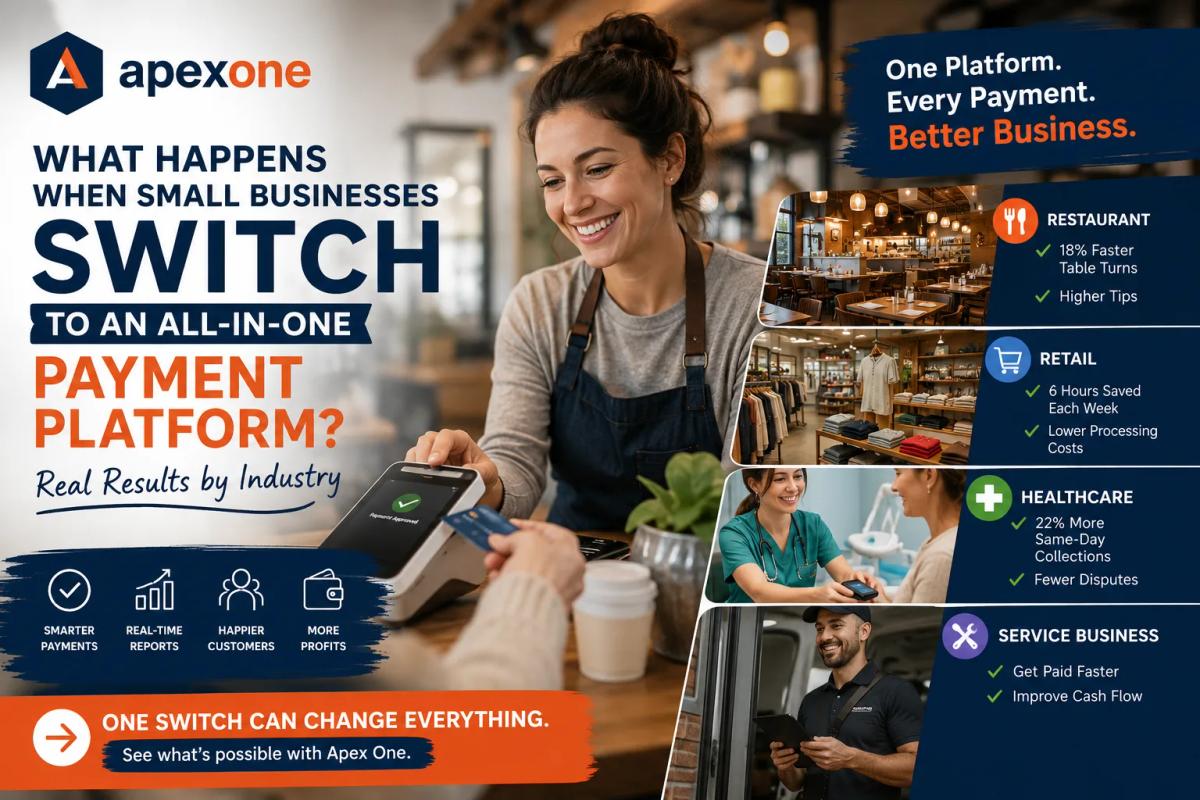
What Happens When Small Businesses Switch to an All-in-One Payment Platform? Real Results by Industry
See what changes when restaurants, retailers, healthcare offices, service businesses, and quick-service shops move from basic terminals to an all-in-one payment platform. This guide shows how better payment processing, POS tools, reporting, kiosks, and support can help small businesses save time, reduce stress, and run smoother.
Most small business owners do not wake up thinking about payment processing.
You are thinking about customers, staff, inventory, appointments, orders, payroll, rent, reviews, and keeping the doors open. Payments are supposed to be simple. A customer pays, the money comes in, and life moves on.
But in real life, it does not always feel that simple.
The terminal is slow. The checkout line gets stuck. Reports do not match deposits. Fees keep changing. Staff members complain about the system. Customers ask for payment options you do not have. And at the end of the month, your merchant statement feels like it was written for accountants, not business owners.
That is where many small businesses start asking a serious question:
“Is my current payment setup actually helping my business, or is it quietly holding me back?”
This blog is not another basic guide about what a POS system is. Apex One Payments already has detailed guides on payment processing for small business and how to choose the best POS system for small business.
This one is different.
Here, we are going to talk about what actually changes when a small business moves from scattered payment tools to an all-in-one payment platform.
Not just features. Not just devices. Not just “low rates.” Real business results.
What Is an All-in-One Payment Platform?
An all-in-one payment platform brings your payment processing, POS system, devices, customer checkout, reporting, online payments, staff tools, and business insights into one connected setup.
In simple words, it helps you stop running your business from five different places.
Instead of using one terminal for card payments, another tool for invoices, another system for reports, another app for online orders, and another login for deposits, an all-in-one payment platform keeps the important parts connected.
A strong platform can help with:
- In-person payment processing
- Online payments
- Mobile payments
- POS for small businesses
- Countertop payment terminals
- POS kiosk solutions
- Clover Station-style setups
- Invoices and payment links
- Staff and user permissions
- Sales reports
- Inventory tools
- Customer records
- Same-day or faster collections
- Cleaner reconciliation
And here is the real point: when these tools work together, the business usually feels easier to manage.
That is what business owners actually care about.
Why Small Businesses Are Moving Away From Basic Terminals
A basic card terminal may be enough when your business is just starting. You plug it in, swipe or tap the card, and accept the payment.
But as the business grows, basic terminals start showing their limits.
You may notice problems like:
- Checkout takes too long during busy hours
- Staff has to enter the same information twice
- Reports do not match deposits clearly
- You cannot easily track card, cash, online, and invoice payments together
- Customers want tap-to-pay or digital receipts
- You need mobile payments away from the counter
- You want a POS kiosk but your system does not support it
- You need better inventory or customer records
- Your processor cannot explain your fees clearly
At that point, the issue is not just “taking payments.”
The issue is how payments connect with the rest of your business.
That is why an all-in-one payment platform can be a smarter move for restaurants, retail stores, healthcare offices, salons, service businesses, grocery stores, and growing local businesses.
The Big Difference: A Payment Platform Helps You Run the Business, Not Just Accept Money
A payment processor moves money.
A POS system handles checkout.
But an all-in-one payment platform should help the owner see what is happening in the business.
That difference matters.
Think about it like this.
A regular terminal says:
“The customer paid.”
A better platform says:
“The customer paid, here is the item sold, here is the staff member, here is the tip, here is the payment type, here is the deposit, here is the report, and here is what changed today.”
That kind of visibility helps owners make better decisions.
And for small businesses, better decisions can mean better margins, faster service, less stress, and more confidence.
Case Study 1: Restaurant — Faster Checkout and Better Table Flow
Restaurants feel payment problems faster than almost any other business.
When checkout slows down, everything slows down.
Tables stay occupied longer. Servers wait for terminals. Customers get impatient. Tips can suffer. And managers feel the pressure, especially on Friday nights and weekends.
In one Apex One Payments restaurant case study, Harbor & Hearth Bistro, a 120-seat waterfront restaurant, replaced three legacy terminals with Apex Station and Flex readers. The staff could run tabs from handhelds, and kitchen tickets synced automatically through the new setup.
The result was not just “new hardware.”
The restaurant saw:
- 18% faster table turns
- 12% higher tip average
- 5-day go-live timeline
That is the kind of result a restaurant owner understands immediately.
Because faster table turns are not just a nice metric. They can affect revenue during busy hours. A smoother checkout experience can help servers close checks faster, help guests leave happier, and help the next table sit sooner.
What This Means for Restaurant Owners
If you run a restaurant, café, bar, bakery, or quick-service business, your payment processing setup should not slow your team down.
You may need:
- Handheld payments
- Countertop payment terminals
- Tip adjustment
- Table-side checkout
- Kitchen-friendly order flow
- Online ordering
- Clean end-of-day reports
- Staff permissions
- Faster deposits
This is where a basic terminal often falls short.
A restaurant needs a payment setup that understands restaurant pressure.
If you are still comparing systems, you can also read Apex One Payments’ guide on Clover vs Square vs Toast to understand how different POS options fit different business types.
Case Study 2: Retail — Cleaner Reports and Less Back-Office Stress
Retail businesses have a different kind of payment problem.
It is not always about table turns or tips. It is about inventory, deposits, checkout lanes, refunds, loyalty, and reconciliation.
A small retail store may start with one simple terminal. But then the business adds more products, more staff, more payment types, and maybe another location.
Suddenly, the owner is trying to answer questions like:
- Why does my deposit not match my sales report?
- Which products sold best this week?
- Which register had the refund?
- How much did we sell in cash vs card?
- Which system has the correct numbers?
In the Apex One Payments retail case study, Northline Market, a neighborhood grocer, unified in-aisle mobile checkout with fixed checkout lanes. Weighted items and loyalty were connected into one catalog and one deposit schedule.
The result:
- 6 hours per week saved on reconciliation
- 0.4% processing cost reduction
- 2 locations on Apex
For a small business owner, saving 6 hours per week is not a small thing.
That is time that can go back into ordering inventory, helping customers, managing staff, improving displays, or simply getting home earlier.
What This Means for Retail Store Owners
If you own a retail store, grocery store, boutique, liquor store, convenience store, smoke shop, gift shop, or specialty store, your POS system should help you understand the business clearly.
You may need:
- Product catalog
- Barcode scanning
- Inventory tracking
- Refund and exchange records
- Customer loyalty
- Multi-device checkout
- Countertop payment terminals
- Mobile checkout
- Sales reports
- One deposit schedule
The right all-in-one payment platform can make retail operations cleaner.
If your current setup makes you chase reports every week, it may be time to review it.
Apex also has a full guide on retail payment processing that explains how store owners can lower fees, speed up checkout, and manage inventory smarter.
Case Study 3: Healthcare — Better Collections Without Adding More Pressure on Staff
Healthcare payment processing is different.
A restaurant customer pays after eating. A retail customer pays at checkout. But in healthcare, payments can be more sensitive.
Patients may pay at the front desk, through a link, after insurance, or later for a remaining balance. Staff members already deal with scheduling, paperwork, patient questions, insurance details, and daily office flow.
So when payment collection is slow or awkward, it creates stress for everyone.
In the Apex One Payments healthcare case study, Summit Dental Group rolled out contactless pay at checkout and text-to-pay for balances. Front desk staff could send payment links from the same dashboard used for scheduling exports.
The results included:
- 22% increase in same-day collections
- 35% fewer chargeback disputes
- 8 readers deployed
That is exactly why all-in-one healthcare payment processing matters.
It is not only about taking a card.
It is about helping the practice collect more smoothly, reduce back-and-forth, and make payment easier for patients and staff.
What This Means for Healthcare Practices
If you run a dental office, clinic, med spa, urgent care, therapy practice, or healthcare service business, your payment setup should feel clean and secure.
You may need:
- Contactless patient payments
- Text-to-pay
- Card-on-file options
- Payment links
- Clear receipts
- Better reporting
- Lower dispute risk
- Front-desk-friendly workflow
- Secure payment processing
Patients do not want payment to feel confusing. Staff does not want another messy system.
A connected payment platform can make the process feel more natural.
For more on this, you can read Apex One Payments’ guide on HIPAA-ready patient payments.
Case Study 4: Service Businesses — Getting Paid Faster After the Job Is Done
Service businesses often have a simple problem:
The work is done, but the payment is not.
A contractor finishes a job and waits for a check. A repair company sends an invoice and follows up three times. A mobile service provider takes card details over the phone. A consultant has unpaid balances sitting for weeks. A cleaning business needs deposits but does not have an easy way to collect them.
That delay creates cash flow stress.
For service businesses, the best payment processing setup is not always a big register or a restaurant-style POS. It may be a mobile POS, invoice tools, payment links, deposits, recurring billing, or a simple countertop terminal at the office.
A good all-in-one payment platform helps service businesses collect payment where the customer is.
That may be at the counter, in the field, online, over the phone, or through a secure payment link.
What This Means for Service Business Owners
If you run a service business, you should ask:
- Can I send payment links?
- Can I collect deposits?
- Can customers pay from their phone?
- Can my staff take mobile payments?
- Can I track paid and unpaid invoices?
- Can I see all payments in one dashboard?
- Can I reduce late payments?
If the answer is no, your payment setup may be making cash flow harder than it needs to be.
Apex has a useful guide on payment processing for service businesses that goes deeper into deposits, invoices, mobile POS, and payment links.
Case Study 5: Quick-Service and Kiosk Businesses — Shorter Lines, Better Ordering, Less Waiting
Now let’s talk about businesses where speed is everything.
Quick-service restaurants, cafés, food courts, bakeries, juice bars, ice cream shops, and busy counter-service locations cannot afford long lines.
When customers wait too long, they leave. Or they order less. Or they get frustrated before the experience even starts.
This is where a POS kiosk can be powerful.
A kiosk gives customers a self-service option. They can browse, order, customize, and pay without waiting for a staff member to take the order manually.
That does not mean replacing people. It means helping your team handle rush hours better.
A good POS kiosk can support:
- Self-ordering
- Integrated payments
- Menu display
- Order customization
- Shorter lines
- Higher ticket opportunities
- Counter and kiosk syncing
- Online ordering connection
For growing food businesses, this can change the entire flow.
Instead of one cashier trying to manage a long line, the business can give customers another way to order and pay.
You can explore this more on the Apex One Payments Kiosk product page.
What These Businesses Had in Common Before Switching
Different industries have different problems, but many businesses share the same payment pain.
Before switching to a better platform, they often deal with things like:
- Too many disconnected systems
- Old countertop payment terminals
- Confusing payment processing fees
- Slow checkout
- Messy reports
- Staff frustration
- No mobile payment option
- No clear deposit tracking
- No easy invoice or payment link option
- No POS kiosk support
- No industry-specific setup
- Poor customer support
- Unclear merchant statements
This is where many owners start feeling stuck.
They do not always know exactly what is wrong. They just know the system feels harder than it should.
And that feeling matters.
When your payment setup is right, the business feels smoother. When it is wrong, even simple tasks feel heavy.
Why “All-in-One” Matters More Than Ever
Small businesses do not need more software just for the sake of software.
They need fewer headaches.
That is the real value of an all-in-one payment platform.
It brings payment processing, POS tools, reporting, devices, online payments, and business workflows closer together.
Instead of asking your team to jump between tools, you create one cleaner payment environment.
That can help you:
- Train staff faster
- Reduce manual work
- Improve checkout speed
- Understand sales better
- Track payments more clearly
- Make reporting easier
- Support different payment types
- Improve customer experience
- Reduce confusion around deposits and fees
This is why the keyword all in one payment platform is important. It matches what small business owners actually want.
They do not want complexity. They want one reliable setup that works.
The Mindset Shift: Stop Buying Devices, Start Building a Payment System
Here is one of the biggest mistakes business owners make.
They shop for a device when they should be building a payment system.
A Clover Station, countertop terminal, mobile reader, or POS kiosk can be useful, but the device is only one part of the decision.
The bigger questions are:
- Will this system fit my business type?
- Will it help my staff move faster?
- Will it make reporting easier?
- Will it reduce payment confusion?
- Will it help me understand my fees?
- Will it grow with my business?
- Will I get real support?
That is the difference between buying a terminal and choosing a payment partner.
A terminal takes payments.
A payment partner helps you build the right payment setup around your business.
When Should a Small Business Consider Switching?
Not every business needs to switch right now.
But if you are seeing the same payment problems again and again, it may be time to review your setup.
Your Checkout Is Slower Than It Should Be
If customers wait too long to pay, you may need better hardware, better POS flow, or mobile payment options.
Your Reports Are Hard to Trust
If sales reports, deposits, tips, refunds, and processor statements do not line up clearly, your system is creating extra work.
Your Processing Fees Keep Rising
If your fees are going up and no one can explain why, that is a serious warning sign.
Your Staff Complains About the POS
Your team uses the system every day. If they constantly struggle with it, customers may feel that frustration too.
You Need More Than One Payment Option
Modern customers expect tap, chip, digital wallets, online payment links, invoices, and contactless options.
You Are Expanding
If you are adding locations, staff, delivery, online ordering, or mobile payments, your old setup may not be enough.
You Want Better Support
If your provider disappears after setup, you may not have the right partner.
If any of this sounds familiar, do not ignore it. A quick review can show whether your current setup still fits your business.
How Apex One Payments Helps Small Businesses Make the Switch
Apex One Payments is built for businesses that want more than a payment processor.
The goal is to help owners choose a payment setup that fits their real workflow.
That may include:
- Payment processing for small business
- POS for small businesses
- Countertop payment terminals
- Clover POS options
- Clover Station Duo
- Mobile card readers
- POS kiosk solutions
- Online ordering
- Payment links
- Dual pricing support
- Merchant services
- Statement reviews
- Reporting tools
- Industry-specific setup
Instead of pushing the same device to every business, the better approach is to look at how the business actually runs.
A restaurant may need handhelds and table-side payments. A retail store may need inventory and fixed checkout lanes. A dental practice may need text-to-pay and contactless patient payments. A service business may need invoices and deposits. A quick-service shop may need a kiosk and faster counter flow.
Different business. Different payment setup.
That is how payment decisions should be made.
Why This Type of Blog Matters for Business Owners
Most payment articles explain features.
But business owners do not buy features just because they sound nice.
They buy outcomes.
They want to know:
- Will this save me time?
- Will this lower my stress?
- Will this help me serve customers faster?
- Will this make my reports cleaner?
- Will this help me understand my fees?
- Will this make collections easier?
- Will this support my business as it grows?
That is why payment platform case studies are powerful.
They show what can happen after the switch.
And for many owners, that is more convincing than a long list of features.
Ready to See What Your Current Payment Setup Is Costing You?
If your payment system feels slow, confusing, or expensive, it may be time to review it.
Start with the Apex One Payments Payment Savings Calculator, explore real merchant outcomes on the case studies page, or contact sales to talk through the right setup for your business.
Final Takeaway: Better Payments Should Create Better Business Results
At the end of the day, payment processing is not just about accepting money.
It is about how smoothly money moves through your business.
It affects your checkout line. It affects your staff. It affects your reports. It affects your deposits. It affects your customer experience. It affects your profit.
So if your current setup feels slow, confusing, expensive, or disconnected, do not just accept it as normal.
There may be a better way.
An all-in-one payment platform can help small businesses bring payments, POS, devices, reports, and customer checkout into one cleaner system.
And when that happens, the business does not just process payments better.
It runs better.
If you want to see what your current setup may be costing you, start with the Apex One Payments Payment Savings Calculator. You can also explore real merchant outcomes on the Apex One Payments case studies page or contact sales to talk through the right setup for your business.
FAQs About All-in-One Payment Platforms
1. What is an all-in-one payment platform?
An all-in-one payment platform is a connected system that helps businesses accept payments, manage POS devices, track sales, view reports, handle online payments, and manage customer checkout from one place.
2. Why do small businesses need an all-in-one payment platform?
Small businesses need an all-in-one payment platform because disconnected tools can create confusion, slow checkout, messy reporting, and extra manual work. A connected platform can make payment processing easier to manage.
3. What is the difference between payment processing and POS?
Payment processing moves money from the customer’s card or payment method to the business. A POS system is the software and hardware used at checkout. The best setup connects both.
4. What does POS for small businesses include?
POS for small businesses may include countertop payment terminals, mobile card readers, Clover Station devices, POS kiosk options, inventory tools, staff permissions, digital receipts, reporting, and customer management.
5. Can an all-in-one payment platform lower payment processing fees?
It can help business owners understand their fees better and may create opportunities to reduce unnecessary costs. The first step is usually reviewing the current merchant statement and comparing the total payment cost.
6. What are payment platform case studies?
Payment platform case studies show how real businesses improved after switching to a new payment setup. They often highlight results like faster checkout, better reporting, lower costs, improved collections, or fewer chargeback disputes.
7. Is a POS kiosk useful for small businesses?
A POS kiosk can be useful for quick-service restaurants, cafés, bakeries, food courts, and other busy counter-service businesses. It can help customers order and pay faster, especially during rush hours.
8. Is Clover Station good for small businesses?
Clover Station can be a strong option for many small businesses that need a professional countertop POS setup, reporting, staff tools, and payment processing support. The right choice depends on the business type and processing needs.
9. What is all-in-one healthcare payment processing?
All-in-one healthcare payment processing helps clinics, dental offices, and healthcare providers accept patient payments, send payment links, support contactless checkout, manage balances, and improve payment reporting in one connected system.
10. When should I switch my payment processor?
You should consider switching if your fees are confusing, your checkout is slow, your reports do not match deposits, your hardware is outdated, your support is poor, or your current provider cannot support your business growth.
11. Are countertop payment terminals still useful?
Yes. Countertop payment terminals are still useful for retail stores, restaurants, salons, clinics, and service counters. The key is choosing a terminal that connects well with your POS, reporting, and payment processing setup.
12. What is one payment merchant services?
One payment merchant services usually refers to a simplified merchant services setup where payment acceptance, POS tools, reporting, devices, and support are connected through one provider or platform.
13. How do I know if my payment processing setup is hurting my business?
Signs include high fees, unclear statements, slow checkout, poor reporting, limited payment options, staff complaints, delayed collections, and lack of support. A merchant statement review can help identify the issue.
14. What should I check before choosing a payment platform?
Check processing fees, hardware options, POS features, contract terms, support, reporting, deposit timing, chargeback tools, online payment options, mobile payments, dual pricing support, and whether the platform fits your industry.
15. Can Apex One Payments help me choose the right setup?
Yes. Apex One Payments helps small businesses review their current payment setup, compare POS and hardware options, understand processing costs, and choose a payment platform based on their business type and goals.